


Last Updated: October 24, 2026
Quick Summary
The best 3D printer for classroom use is an enclosed, self-leveling machine that survives shared access and needs minimal supervision, not the fastest or cheapest option. Schools most commonly report the Bambu Lab P1S and Bambu Lab A1 Mini, with the A1 Mini a frequent pick for elementary classrooms.
- Enclosed designs with filtered ventilation are the safer default for school printers.
- Manual bed leveling is the most common reason classroom prints fail.
- Budget-friendly classroom printers cluster in the $400-$900 range.
- Budget a maintenance reserve of roughly 10-15% of the purchase price per year.
- PLA is the standard classroom filament: easy to print, low-odor, widely available.
Table of Contents
- Why the Best 3D Printer for Classroom Use Isn’t the Same as a Home Printer
- Classroom 3D Printer Safety: Enclosed Designs, Ventilation, and Supervision
- Top Picks by Age Group and Grade Level
- Budget-Friendly Models and Total Cost of Ownership
- 3D Printer Materials for Classroom Projects: Filament Safety and Selection
- 3D Printing Lesson Plans and Curriculum Integration
- 3D-Printed Anatomy Models for Education: A High-Impact Use Case
- Setup, IT Requirements, and Long-Term Reliability
- Frequently Asked Questions
Why the Best 3D Printer for Classroom Use Isn’t the Same as a Home Printer
The best 3D printer for classroom use is not the fastest or cheapest machine on a spec sheet.
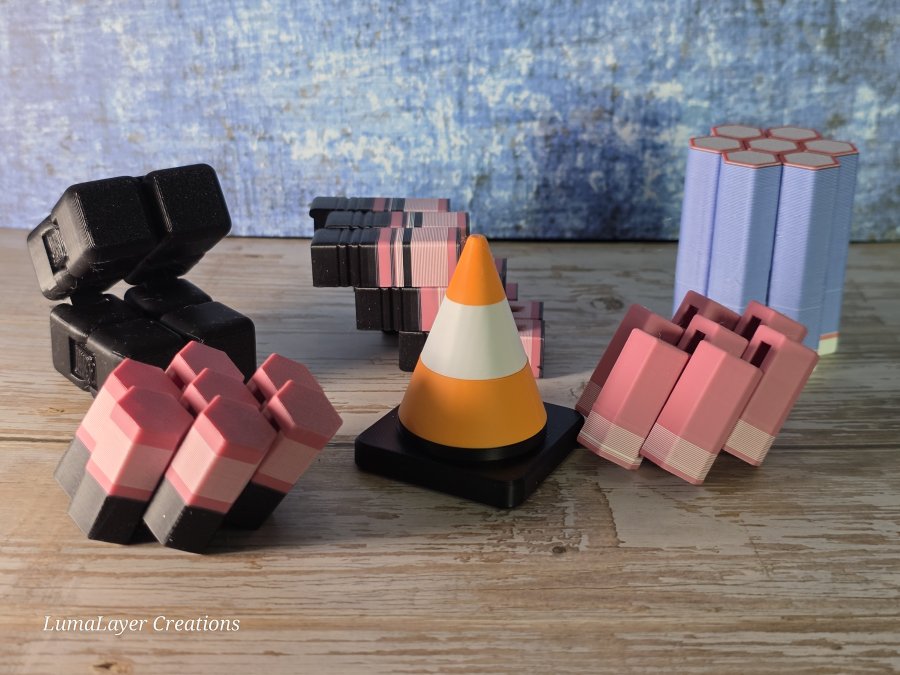
3D printed fidgets
A home printer serves one careful owner. A classroom printer serves thirty students with varying patience and hand strength.
Below, we break down what separates a classroom workhorse from a home hobby machine, plus picks by grade level and a realistic look at total cost.
Throughput, Supervision, and Shared Access
A classroom printer runs in bursts: a full class, then nothing for hours. That pattern stresses machines differently than continuous hobby printing. Look for quick-swap nozzles, reliable bed leveling, and a print queue students can manage without an adult hovering.
Supervision matters more than speed. A printer that finishes a part in record time but needs constant babysitting costs a teacher more attention than a slower, self-correcting model.
What to Ignore in Printer Spec Sheets
Maximum print speed is the most overrated number in classroom buying. Students rarely need the fastest machine. They need one that finishes overnight without failing.
Ignore marketing claims about exotic materials and focus on repeatability, filament availability, and how easily a jam gets cleared by a student or aide.
Classroom 3D Printer Safety: Enclosed Designs, Ventilation, and Supervision
Classroom 3D printer safety starts with an enclosed design, filtered ventilation, and clear supervision rules. Open-frame printers expose students to hot components and fumes, so enclosed models are the safer default for schools.
A 2026 buying guide from 3D Printing for Kids and Schools recommends enclosed printers with filtration and simple interfaces for classroom use. That matches what most safety-conscious districts already require.
Set three rules before the first print: no reaching inside during operation, no changing filament without supervision, and no printing in an unventilated closet. Place the machine on a stable surface away from walkways.
Top Picks by Age Group and Grade Level
The right printer changes with the age of the students. Younger kids need simplicity and safety; older students can handle more machine and more responsibility.
Elementary School (K-5)
For elementary classrooms, prioritize a small, enclosed, beginner-friendly machine with a touchscreen and automatic bed leveling. The Bambu Lab A1 Mini is a frequent classroom pick because it is compact and easy to operate, and a Sovol classroom guide names it as a top choice for younger students.
Middle and High School (6-12)
Middle and high school students can run larger, more capable machines. A 2026 SimplyPrint school printer roundup names the Bambu Lab P2S as its top school pick, the Anycubic Kobra S1 for the $400-$900 tier, and the Prusa CORE One as its most open, repairable option.
|
Grade Level |
Best Fit |
Why It Works |
Watch For |
|---|---|---|---|
|
K-5 |
Bambu Lab A1 Mini |
Compact, enclosed, simple controls |
Small build volume |
|
6-8 |
Anycubic Kobra S1 |
Mid-budget, capable, easy setup |
Less filtration |
|
9-12 |
Bambu Lab P2S |
Fast, reliable, school-tested |
Higher upfront cost |
|
Makerspace |
Prusa CORE One |
Open, repairable, upgradeable |
Requires more know-how |
Budget-Friendly Models and Total Cost of Ownership
The sticker price is only part of the story. Total cost of ownership includes filament, replacement parts, maintenance time, and the cost of failed prints.
Budget-friendly classroom printers cluster in the $400-$900 range, where machines like the Anycubic Kobra S1 sit. Above that, the Bambu Lab P2S and Prusa CORE One move into the $700-$1,200 tier depending on configuration and enclosure.
A Four-Line TCO Model Schools Can Actually Use
Most practitioners find that a classroom printer’s first-year cost breaks into four lines. Build the budget around all four, not just the machine:
- Capital cost, the printer itself, plus any enclosure, filtration, and a sturdy table or cart.
- Consumables, filament, build plates, and adhesive. A single spool runs roughly $20-$30 for standard PLA; a busy classroom can burn through several spools a month during a design unit.
- Spares and wear parts, nozzles, PTFE tubing, and at least one spare build plate. Nozzles are consumables, not lifetime parts, and a clogged nozzle is the most common failure a teacher will face.
- Labor and downtime, the hidden line. Every failed print costs class time and teacher attention, and that is the cost a cheap machine inflates fastest.
Where Cheap Printers Get Expensive
The failure modes that drive TCO up are predictable. Manual bed leveling eats prep time before every class. Open frames without filtration push schools toward buying an enclosure after the fact.
For schools planning larger purchases, our guide to anatomical models explains how to budget across multiple body systems and classrooms. Readers can also review bulk educational pricing for anatomical models to plan purchases across grade levels.
3D Printer Materials for Classroom Projects: Filament Safety and Selection
PLA is the standard choice for classroom 3D printing because it is easy to print, low-odor, and widely available. Choose reputable, non-toxic filament and store it sealed to prevent moisture damage.
Avoid specialty filaments in beginner classrooms. ABS and other high-temperature materials release more fumes and demand enclosed, filtered setups. Stick to PLA for most K-12 projects.
- PLA: Best all-around choice for classrooms, low odor, easy to print
- PETG: Tougher parts, slightly harder to dial in
- TPU: Flexible parts, advanced users only
3D Printing Lesson Plans and Curriculum Integration
Strong 3D printing lesson plans tie a print to a real learning objective, not just a cool object. Start with a design challenge, have students model it, then print and iterate.
Sample Project Ideas by Subject
- Science: Print a cell model or simple machine and label the parts
- Math: Design geometric solids and measure volume
- History: Recreate artifacts and discuss scale
Teachers planning a full unit can pair printing with our anatomy teaching tools for educators guide for ready-made classroom resources.
3D-Printed Anatomy Models for Education: A High-Impact Use Case
3D-printed anatomy models for education turn abstract diagrams into objects students can hold, rotate, and examine.
For medical and health science classes, physical models help students understand spatial relationships that flat images cannot convey. A 2023 study in Frontiers in Education looked at how teachers perceive integrating 3D printing into teaching, and the interest is clearly growing.
At LumaLayer Creations, we craft custom 3D-printed anatomical models designed to make complex biological structures tangible for classrooms and clinics. Educators exploring options can browse our guide to 3D-printed anatomical models, and instructors new to models can read how to teach anatomy with models.
Setup, IT Requirements, and Long-Term Reliability
Setup and reliability decide whether a classroom printer gets used or gathers dust. Most modern enclosed printers connect over Wi-Fi or USB and use a slicer students can learn in one session, but the decisions that sink classroom deployments are usually made by the IT team, not the teacher.
What School IT Teams Need to Know Before the Printer Arrives
Cloud-connected printers are convenient and create work for IT. Before you buy, answer these questions with your technology coordinator:
- Accounts and student data. Does the printer or its cloud service require student accounts? If so, what data leaves the building, and does it comply with district policy and applicable student privacy requirements? Prefer workflows that let a teacher account own the queue rather than requiring every student to sign up.
- Network restrictions. Many districts block unknown devices on the Wi-Fi network. Confirm whether the printer can run on an isolated VLAN, whether it supports offline or USB-only operation, and whether firmware updates can be scheduled rather than pushed mid-class.
- File workflow. Decide early whether students submit jobs through a shared folder, a print-management tool, or a teacher-mediated queue. A managed queue keeps jobs orderly and prevents one student from monopolizing the machine.
Long-Term Reliability: What to Track, Not Just What to Believe
Spec sheets do not tell you how a printer behaves after a semester of shared use. Build your own evidence instead of relying on marketing claims:
- Log every failure. Note the date, the cause (jam, adhesion, layer shift), and how long it took to fix. After a month you will know your real failure rate.
- Track maintenance frequency. How often do you replace a nozzle, clean a build plate, or re-level? Rising frequency is an early warning.
- Watch the first ten minutes. Most classroom failures show up early. A teacher who checks the first layer before stepping away catches the majority of problems.
A school-focused video flagged setup and finding suitable classroom projects as the top pre-purchase considerations, and both are worth solving before the machine arrives. Durability matters when students handle models constantly. Our article on how durable 3D-printed classroom models are covers what holds up under daily use.
Frequently Asked Questions
What should teachers look for in a classroom 3D printer?
Prioritize an enclosed design with filtration, a simple touchscreen interface, and a build volume large enough for class projects. Check that the slicer software is beginner-friendly and that the manufacturer offers phone or email support during school hours. A 2026 SimplyPrint guide names the Bambu Lab P2S as its top school pick and the Prusa CORE One as its most open choice, showing that both closed and open ecosystems can work. Also confirm the printer fits your classroom 3D printer safety plan and your IT network rules before ordering.
Are enclosed 3D printers safer for classroom use?
Enclosed models reduce student contact with hot parts and moving mechanisms, and they contain odors and ultrafine particles better than open-frame designs. A 2026 guide recommends enclosed printers with filtration for classrooms, citing the FlashForge Adventurer 5M Pro and an enclosed Bambu Lab model. Enclosure alone is not enough: place the printer in a well-ventilated area, supervise prints, and follow the manufacturer’s ventilation guidance. Classroom 3D printer safety depends on setup and supervision as much as on the machine itself.
Which 3D printer materials are suitable for student projects?
PLA is the standard choice for classrooms because it prints at lower temperatures, has little odor, and is widely available. PETG offers more durability for functional parts but needs higher nozzle temperatures. Avoid ABS and other styrene-based filaments in classrooms without dedicated ventilation. A 2025 ACM case study examined 3D printing as an accessible format for graphics for people who are blind or have low vision, which shows how material and design choices can support accessibility. Match 3D printer materials for classroom projects to the age group and the project’s strength needs.
How can teachers use 3D-printed anatomy models in lessons?
3D-printed anatomy models let students handle and disassemble structures that are otherwise flat diagrams. A 2023 Frontiers in Education study examined teachers’ perceptions of integrating 3D printing into teaching, and the results support pairing the printer with structured lesson plans rather than free printing. Start with one body system, print a model at a size students can pass around, and build 3D printing lesson plans around labeling, comparison, and function. For 3D-printed anatomy models for education, durability matters because students handle them constantly.
A classroom printer only pays off when it runs reliably and the models survive student handling. LumaLayer Creations supports educators with custom 3D-printed anatomical models built to make biology tangible, plus original designs and resources that blend science and curiosity. Explore our shop to find models and materials ready for your classroom, and get started with LumaLayer Creations today.

0 Comments